I've Got A Question RE: Installing Windows 7

Home Archive Serious Business I've Got A Question RE: Installing Windows 7
O-Trap's avatar

O-Trap

Chief Shenanigans Officer

14,994 posts
Nov 29, 2010 7:47 PM
Alright, I've got a secondary laptop whose HD went bad. I installed a robust new one (500GB). Now, I'd like to install Windows 7 on it.

1. What are the RAM requirements for 7?

2. Once I insert the disk, reboot, and boot from the CD/DVD drive, I get the message "Operating System not found.". Is there something else in the process I'm missing?

Thanks!
Nov 29, 2010 7:47pm
karen lotz's avatar

karen lotz

TuTu Train

22,284 posts
Nov 29, 2010 7:52 PM
What disk did you try installing? Is it full Windows 7 or the upgrade version from Vista?
Nov 29, 2010 7:52pm
karen lotz's avatar

karen lotz

TuTu Train

22,284 posts
Nov 29, 2010 7:53 PM
And from the Microsoft website, 1 GB of RAM is needed.
Nov 29, 2010 7:53pm
I

I Wear Pants

Senior Member

16,223 posts
Nov 29, 2010 8:11 PM
O-Trap;581160 wrote:Alright, I've got a secondary laptop whose HD went bad. I installed a robust new one (500GB). Now, I'd like to install Windows 7 on it.

1. What are the RAM requirements for 7?

2. Once I insert the disk, reboot, and boot from the CD/DVD drive, I get the message "Operating System not found.". Is there something else in the process I'm missing?

Thanks!
I think 1gb is the requirement although 2 is obviously better.

What are you rebooting from? (IE: Do you have an OS currently installed?)
Nov 29, 2010 8:11pm
O-Trap's avatar

O-Trap

Chief Shenanigans Officer

14,994 posts
Nov 29, 2010 9:26 PM
It's the full OS. HD is brand new. Never installed a new HD before.
Nov 29, 2010 9:26pm
I

I Wear Pants

Senior Member

16,223 posts
Nov 29, 2010 9:33 PM
So it's a blank HD with no OS currently installed then?
Nov 29, 2010 9:33pm
O-Trap's avatar

O-Trap

Chief Shenanigans Officer

14,994 posts
Nov 29, 2010 9:44 PM
Correct.
Nov 29, 2010 9:44pm
I

I Wear Pants

Senior Member

16,223 posts
Nov 29, 2010 10:16 PM
It should be fairly straight forward if you boot from the disc.

Are you sure you hit the correct key to boot from the disc and is there any chance you could get some images of the error and BIOS screens?
Nov 29, 2010 10:16pm
O-Trap's avatar

O-Trap

Chief Shenanigans Officer

14,994 posts
Nov 29, 2010 10:28 PM
Sure. Just give me a bit. Working on the other laptop as well so it's not up yet either.

FWIW, from the BIOS Setup Utility, under the diagnostics tab, I ran a Hard Disk self test and all read A-OK there.

I'll try to get some pictures up.
Nov 29, 2010 10:28pm
O-Trap's avatar

O-Trap

Chief Shenanigans Officer

14,994 posts
Nov 30, 2010 12:11 AM
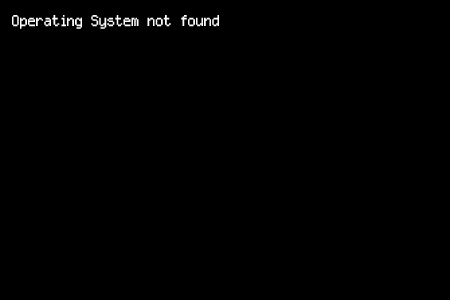
Really, after inserting the disk and booting from disk, I just end up with a screen like this, with nothing but this in the top left corner.

Nov 30, 2010 12:11am
wes_mantooth's avatar

wes_mantooth

Tomfoolery & shenanigans

17,977 posts
Nov 30, 2010 12:21 AM
I Wear Pants;581378 wrote:It should be fairly straight forward if you boot from the disc.

Are you sure you hit the correct key to boot from the disc and is there any chance you could get some images of the error and BIOS screens?

not sure what buttons to hit, but this is correct...you have to make sure you are booting up from disk, not the HD.

http://pcsupport.about.com/od/tipstricks/ht/bootcddvd.htm
Nov 30, 2010 12:21am
hoops23's avatar

hoops23

Senior Member

15,696 posts
Nov 30, 2010 12:24 AM
Can't you hold ctrl+c while booting up? I don't remember.
Nov 30, 2010 12:24am
O-Trap's avatar

O-Trap

Chief Shenanigans Officer

14,994 posts
Nov 30, 2010 12:42 AM
ATAPI CD/DVD ROM Drive is first in the boot order.
Nov 30, 2010 12:42am
O-Trap's avatar

O-Trap

Chief Shenanigans Officer

14,994 posts
Nov 30, 2010 1:32 AM
Just thought of something. Maybe it's the disk drive.

What if I burned the ISO to my USB harddrive and booted from a USB? Would that work?

If it did, would I be able to get the ISO off my external HD afterward?
Nov 30, 2010 1:32am
Curly J's avatar

Curly J

Self Pwner in Training.

7,282 posts
Nov 30, 2010 1:59 AM
O-Trap, it sounds like its jumping from your CD too your Hdd. I see this every day re-imaging PCs. Maybe try the Hdd on your newer laptop and see how it takes...but the way you are talking about the ISO file may work too.
Nov 30, 2010 1:59am
I

I Wear Pants

Senior Member

16,223 posts
Nov 30, 2010 12:32 PM
It should work if you do it from the ISO.
Nov 30, 2010 12:32pm
TedSheckler's avatar

TedSheckler

Emporium Entrepreneur

3,974 posts
Nov 30, 2010 1:14 PM
Make sure you have the CD/DVD as the first booting device. sounds like it's set to the hard drive as the first booting device. Change it in the BIOS.
Nov 30, 2010 1:14pm
FatHobbit's avatar

FatHobbit

Senior Member

8,651 posts
Nov 30, 2010 1:36 PM
TedSheckler;582037 wrote:Make sure you have the CD/DVD as the first booting device. sounds like it's set to the hard drive as the first booting device. Change it in the BIOS.

I agree with that, but he already tried that. For some reason it's not booting from the CD.
Nov 30, 2010 1:36pm
I

I Wear Pants

Senior Member

16,223 posts
Nov 30, 2010 2:31 PM
But it seems like it's trying to boot from the hard disk. He should maybe set it back to the HDD as the first boot drive and then when he boots up the BIOS should bring up a screen with "Press F(some number)" to select boot device. Perhaps he should do it that way?
Nov 30, 2010 2:31pm
FatHobbit's avatar

FatHobbit

Senior Member

8,651 posts
Nov 30, 2010 2:32 PM
I Wear Pants;582131 wrote:But it seems like it's trying to boot from the hard disk. He should maybe set it back to the HDD as the first boot drive and then when he boots up the BIOS should bring up a screen with "Press F(some number)" to select boot device. Perhaps he should do it that way?

It couldn't hurt to try. :)
Nov 30, 2010 2:32pm
O-Trap's avatar

O-Trap

Chief Shenanigans Officer

14,994 posts
Nov 30, 2010 3:01 PM
Tried it. Failed.

Here's what I'm going to try. I'm going to grab a software to copy the ISO from the disk to a flash drive. Then, I'm going to try to boot from USB. If the problem lies in the disk drive, I'm thinking that would work. Any reason why it wouldn't?
Nov 30, 2010 3:01pm
B

bo shemmy3337

Senior Member

962 posts
Nov 30, 2010 3:18 PM
Sometimes you have to force it to run off the cd. What I mean by that is hit the f10 or f12 during the booting process and it should bring up the boot options menu. Which then you can select the dvd drive.

Currently this is a bios problem and has nothing to do with your new HDD. You can boot off of a cd if there is not a HDD at all. Don't worry once you get it to boot from the cd you will be fine as long as your board recognizes your HDD.
Nov 30, 2010 3:18pm
B

bo shemmy3337

Senior Member

962 posts
Nov 30, 2010 3:19 PM
I Wear Pants;582131 wrote:But it seems like it's trying to boot from the hard disk. He should maybe set it back to the HDD as the first boot drive and then when he boots up the BIOS should bring up a screen with "Press F(some number)" to select boot device. Perhaps he should do it that way?

I agree just setting the boot order is not enough sometimes as things get confused when new hardware is inserted. Just find out what f key is needed to bring up the boot options and then select the dvd drive.
Nov 30, 2010 3:19pm
O-Trap's avatar

O-Trap

Chief Shenanigans Officer

14,994 posts
Nov 30, 2010 3:30 PM
Tried it. Failed.

Here's what I'm going to try. I'm going to grab a software to copy the ISO from the disk to a flash drive. Then, I'm going to try to boot from USB. If the problem lies in the disk drive, I'm thinking that would work. Any reason why it wouldn't?

EDIT: Okay, how can I make the ISO boot automatically from the USB. The ISO appears merely as a file within the flash drive, but I'm trying to make the flash drive work in the same way the disk does.
Nov 30, 2010 3:30pm