My TV is too big???

Home Archive Serious Business My TV is too big???
Ironman92's avatar

Ironman92

Administrator

49,363 posts
Nov 26, 2010 9:40 PM
Made it to Walmart.....got my ticket....bought my 46 inch Samsung 120 hz...got it home, put together new tv stand (ok my wife did most of it) hook up new HD receiver and I couldn't take it. I knocked down the factory presets on the brightness and contrast and it looked great from 15 feet away and well beyond...but my living room is prettylimited on it's setup and the leather recliner could not be tolerated that close........I finally decided to take it back and get the40 inch Samsung 120 hz...it fits better and looks better...but it is still so powerfully bright.

Do the HD top notch tv's bother anyone elses eyes? It also bothers me when my son played the Wii and I watched for too long...on the old tv even. I used to have 20/12 20/15 eyesight.....could my eyesight be too good, thus making them sensitive to the sharp contrast and brightness or are maybe my eyes losing it a little?

Florescent (sp) lights tend to bother me as well.
Nov 26, 2010 9:40pm
R

raiderbuck

Senior Member

1,623 posts
Nov 26, 2010 10:09 PM
Not sure what settings you have, but I have a 46" Bravia, an my living room is tiny. Primary viewing distance is about 10 feet. To help with the contrast try adding some ambient lighting around the tv. It will help your eyes adjust to the brightness. Also, check to see if your tv has a "movie" or "cinema" mode...most do, or if you feel like it just play around with the settings until you get the most comfortable screen.

edit....just saw your other thread about taking said tv back to the store...so just..ignore all that
Nov 26, 2010 10:09pm
darbypitcher22's avatar

darbypitcher22

Senior Member

8,000 posts
Nov 26, 2010 10:46 PM
the brighter, the better... especially when its in HD...

at least that's how I feel
Nov 26, 2010 10:46pm
R

raiderbuck

Senior Member

1,623 posts
Nov 26, 2010 11:11 PM
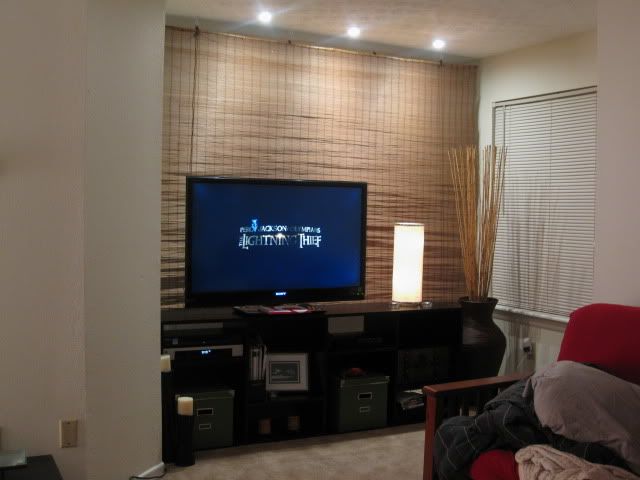
^^that's not always the best thing for your eyes, tv, or the picture. HD should look realistic, not just bright. A good picture always looks clear, with good color, and should have at least some kind of "depth" to the picture. A lot of times the stores put the tv's on display with a picture quality that wouldn't be ideal for home viewing.

This is my set up below. I added the brown shade and lamp for decoration, but it also helps ease eyesore. Before I had just the TV against the white wall, and although it was nice I found myself adjusting the settings a whole lot more.

Nov 26, 2010 11:11pm
wes_mantooth's avatar

wes_mantooth

Tomfoolery & shenanigans

17,977 posts
Nov 26, 2010 11:24 PM
Honestly, I would check for your exact model over on www.avsforum.com. They can tell you which of the factory settings to turn off and they are usually spot on with the calibration of tvs. A lot of the factory settings usually need turned off cuz they actually make the picture worse.
Nov 26, 2010 11:24pm
Fab1b's avatar

Fab1b

The Bald A-Hole!!

12,949 posts
Nov 26, 2010 11:39 PM
Have my 50' Sony Plasma on vivid, it's beautiful!
Nov 26, 2010 11:39pm
M

Manhattan Buckeye

Senior Member

7,566 posts
Nov 27, 2010 11:02 AM
That's what she said.
Nov 27, 2010 11:02am
Mooney44Cards's avatar

Mooney44Cards

Senior Member

2,754 posts
Nov 27, 2010 11:38 AM
The TVs are set to their brightest settings out of the box because bright TVs sell better on the sales floor. Not only is the brighter setting bad for your eyes, its bad for the tv. If you leave it on those settings you'll probably knock a year or two off the overall lifespan of the tv if you're a heavy watcher.

Do yourself a favor and put the TV on some sort of cinema mode thats not so bright.
Nov 27, 2010 11:38am
M

MontyBrunswick

Nov 27, 2010 1:53 PM
If anything is bothering your eyes it's probably 120hz.
Nov 27, 2010 1:53pm
Z

ZombieKiller

Senior Member

817 posts
Nov 27, 2010 3:59 PM
46 inch? That's small as hell. I prefer my 78 inch tv
Nov 27, 2010 3:59pm
justincredible's avatar

justincredible

Nick Mangold

32,056 posts
Nov 27, 2010 4:46 PM
ZombieKiller;577685 wrote:46 inch? That's small as hell. I prefer my 78 inch tv

A 78 inch tv is lame. My 100 inch tv is way better.
Nov 27, 2010 4:46pm
Ironman92's avatar

Ironman92

Administrator

49,363 posts
Nov 27, 2010 4:47 PM
the 120 hz is killer compared to the 60 hz


thanks for the serious comments of assistance...didn't figure to get many
Nov 27, 2010 4:47pm
C

Con_Alma

Senior Member

12,198 posts
Nov 27, 2010 5:00 PM
Maybe the problem isn't that the TV is too big but that the room is too small.

Just a thought.
Nov 27, 2010 5:00pm
Ironman92's avatar

Ironman92

Administrator

49,363 posts
Nov 27, 2010 5:19 PM
My living room is 15 by 25....the leather chair I enjoy is only about 7 feet away......love seat 10 ft and couch about 18 feet away

the room is plenty big....but I didn't give any specifications so you couldn't have known that....the recliner was great on my old 27 inch but am still struggling with how sharp and clear it is from 7 feet.....gonna have to shift somehow
Nov 27, 2010 5:19pm
Ironman92's avatar

Ironman92

Administrator

49,363 posts
Nov 27, 2010 5:31 PM
tried the avsforum...but it won't let me post yet
Nov 27, 2010 5:31pm
GoJPM!'s avatar

GoJPM!

Senior Member

799 posts
Nov 27, 2010 10:00 PM
^You can use their search function to find threads on your particular tv. It's a good forum to get picture settings from. The guys on there are pretty knowledgable. Some post settings from pro-style calibrations.
Nov 27, 2010 10:00pm
Z

ZombieKiller

Senior Member

817 posts
Nov 28, 2010 7:31 AM
justincredible;577716 wrote:A 78 inch tv is lame. My 100 inch tv is way better.

I find it hard to believe you have an 100 inch tv
Nov 28, 2010 7:31am
W

WebFire

Go Bucks!

14,779 posts
Nov 28, 2010 9:41 AM
Ironman92;577747 wrote:My living room is 15 by 25....the leather chair I enjoy is only about 7 feet away......love seat 10 ft and couch about 18 feet away

the room is plenty big....but I didn't give any specifications so you couldn't have known that....the recliner was great on my old 27 inch but am still struggling with how sharp and clear it is from 7 feet.....gonna have to shift somehow

46" should have been fine. My LR is like 16x14 and I have a 47" with no problems. My small couch is only about 5' away.
Nov 28, 2010 9:41am
McFly1955's avatar

McFly1955

Senior Member

1,441 posts
Nov 29, 2010 9:45 AM
At 7' away, a 46" TV should be fine.

My guess is they had the settings blasted, I recommend getting some calibration settings from avsforum and dialing those in on the TV...Brighter isn't always better.

In our basement, we have a projector set up, 92" at 10' away, and it is perfect....Upstairs we have a 50" plasma at 8-9' away and it works well. I don't think you had an issue with the size, more of an issue with the settings, and getting used to a new set.
Nov 29, 2010 9:45am
O-Trap's avatar

O-Trap

Chief Shenanigans Officer

14,994 posts
Nov 29, 2010 10:24 AM
I'll trade you. I have a 19" tube television.
Nov 29, 2010 10:24am
DeyDurkie5's avatar

DeyDurkie5

Senior Member

11,324 posts
Nov 29, 2010 10:47 AM
ZombieKiller;578641 wrote:I find it hard to believe you have an 100 inch tv

you changed your name after the auburn win didn't you? LOL
Nov 29, 2010 10:47am
O-Trap's avatar

O-Trap

Chief Shenanigans Officer

14,994 posts
Nov 29, 2010 1:03 PM
ZombieKiller;578641 wrote:I find it hard to believe you have an 100 inch tv

I've seen it. It's true. Me 'n Mrs. Justincredible watch it while he's at work.

She says it's not my TV that's too big.
Nov 29, 2010 1:03pm
Z

ZombieKiller

Senior Member

817 posts
Dec 3, 2010 8:56 PM
DeyDurkie5;580408 wrote:you changed your name after the auburn win didn't you? LOL

no..I've always had this name
Dec 3, 2010 8:56pm
DeyDurkie5's avatar

DeyDurkie5

Senior Member

11,324 posts
Dec 3, 2010 9:06 PM
ZombieKiller;586734 wrote:no..I've always had this name

zombaypirate?
Dec 3, 2010 9:06pm