Watching movies on your tv from your computer.

Home Archive Serious Business Watching movies on your tv from your computer.
Ytowngirlinfla's avatar

Ytowngirlinfla

I wear real chevrons!

2,295 posts
Aug 14, 2010 8:28 PM
Here's the deal about to buy a 26" Vizio LCD LED tv. I have a bunch of movies on my hard drive on 2 computers. Both the tv and computers have HDMI on them. So what does it take to watch movies from my computer to the tv?
Aug 14, 2010 8:28pm
#1DBag's avatar

#1DBag

Nothing to see here.

786 posts
Aug 14, 2010 8:30 PM
First!
Aug 14, 2010 8:30pm
Firad's avatar

Firad

Senior Member

1,525 posts
Aug 14, 2010 8:32 PM
You can buy a cord that's about $20 at Wal-Mart that plugs in your computer and the TV. It basically makes your TV into an external monitor than you can do basically anything on your computer on the TV.
Aug 14, 2010 8:32pm
namod65's avatar

namod65

Senior Member

508 posts
Aug 14, 2010 8:37 PM
Yes do this. Newegg is a good site too. If you pay anything more than $10 for a HDMI cable you are getting ripped off. I'm watching Avatar in 1080p right now through a $5 HDMI cable I got of Newegg, and it looks great.
Aug 14, 2010 8:37pm
Ytowngirlinfla's avatar

Ytowngirlinfla

I wear real chevrons!

2,295 posts
Aug 14, 2010 8:40 PM
Are there any settings on the computer you have to do to make it work?
Aug 14, 2010 8:40pm
CinciX12's avatar

CinciX12

Senior Member

2,874 posts
Aug 14, 2010 9:32 PM
You should just have to change the input on your tv to the HDMI setting. Should work a lot like my PS3 going thru the HDMI input.
Aug 14, 2010 9:32pm
karen lotz's avatar

karen lotz

TuTu Train

22,284 posts
Aug 14, 2010 9:35 PM
Ytowngirlinfla;451313 wrote:Are there any settings on the computer you have to do to make it work?


You might have to change your display setting on your computer. You can have it duplicate your desktop, act as your desktop, or extend your desktop. If you have it duplicate it, both screens will show the same thing. If you extend your desktop, if you move your cursor all the way to the top (or sides depending on how you set it up) the cursor will jump to the TV screen.
Aug 14, 2010 9:35pm
CinciX12's avatar

CinciX12

Senior Member

2,874 posts
Aug 14, 2010 9:36 PM
Good point. Its better to not have the picture leave your laptop screen and have to use the mouse on that and look at the tv monitor.
Aug 14, 2010 9:36pm
UA5straightin2008's avatar

UA5straightin2008

WOMP WOMP WOMP

3,246 posts
Aug 14, 2010 9:47 PM
how do i do this with a mac? i know i have that white cord that looks like this but i dont know what needs to be hooked between that and the tv

Aug 14, 2010 9:47pm
GoChiefs's avatar

GoChiefs

Resident Maniac

16,754 posts
Aug 14, 2010 9:55 PM
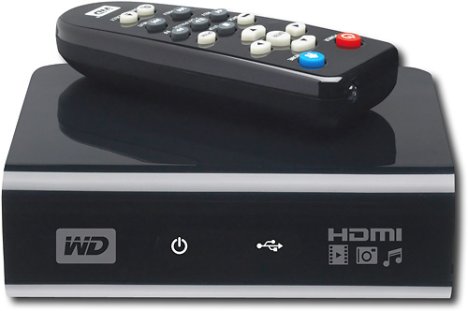
I use this....

Aug 14, 2010 9:55pm
namod65's avatar

namod65

Senior Member

508 posts
Aug 14, 2010 10:41 PM
Another issue you might have is if you want to use a sound system that's not the TV's speakers. HDMI cables transmit the audio as well. When you plug it in it's going to automatically use the TV's speakers for sound. If you have another system like I do, you'll have to change this. I had to do a little bit of tweaking in the sound settings to get the HDMI to stop transmitting the audio so I could plug my system into the stereo jack. I actually found this easier to do in Vista when I had it. It took me a little longer to figure out how to do it in Windows 7.
Aug 14, 2010 10:41pm
namod65's avatar

namod65

Senior Member

508 posts
Aug 14, 2010 10:48 PM
UA5straightin2008;451401 wrote:how do i do this with a mac? i know i have that white cord that looks like this but i dont know what needs to be hooked between that and the tv
Haha yes I forgot most Macs don't have HDMI. I can't really see the upper end of your adapter there but I think that connects to your computer and the other end is either a VGA or DVI connector. Most TV's will have a VGA input (this the cable with blue ends). I don't think as many have DVI (looks similar to the VGA except with white ends). Check your TV and see which input is on it, then just get a VGA or DVI cord and use that adapter. VGA quality may not be as good because it's analog and not digital, but if you're not watch 1080p stuff I don't think it will matter.
Aug 14, 2010 10:48pm
lhs07's avatar

lhs07

Member

44 posts
Aug 15, 2010 3:00 AM
GoChiefs;451407 wrote:I use this....


What exactly is "this"?
Aug 15, 2010 3:00am
GoChiefs's avatar

GoChiefs

Resident Maniac

16,754 posts
Aug 15, 2010 11:41 AM
lhs07;451601 wrote:What exactly is "this"?

It's a WD media player...it hooks up to your TV with HDMI or RCA jacks. You load up an external hard drive..and plug it into the USB ports of the box..then all the movies that are on your hard drive are right there at your fingertips on your TV. I have two 500 GB external hard drives full of movies. I turn the box on, and I have almost 2,000 movies right there to choose from.
Aug 15, 2010 11:41am